BPMN Support
Learn a model from a DataFrame with process discovery, or start from a process tree. For replay and model manipulation, see Petri net management.
PM4Py provides support for importing, exporting, and laying out BPMN diagrams. The supported BPMN elements are limited to the following:
- Events (start/end events)
- Tasks
- Gateways (exclusive, parallel, inclusive)
Additionally, we offer functionality for converting between BPMN models and other process models implemented in PM4Py, such as Petri nets and BPMN diagrams.
BPMN 2.0 - Importing
BPMN 2.0 XML files can be imported using the following instructions:
import pm4py
import os
from pm4py.objects.bpmn.obj import BPMN

if __name__ == "__main__":
    bpmn_graph: BPMN = pm4py.read_bpmn(os.path.join("tests", "input_data", "running-example.bpmn"))
BPMN 2.0 - Exporting
BPMN models can be exported using the following instructions. In this case, bpmn_graph is the Python object containing the model.
import pm4py
import os
if __name__ == "__main__":
    pm4py.write_bpmn(bpmn_graph, "ru.bpmn")
BPMN 2.0 - Layouting
Layouting aims to arrange the nodes and edges of the BPMN diagram in an aesthetically pleasing manner. For this purpose, PM4Py provides robust functionality for laying out and visualizing Business Process Model and Notation (BPMN) diagrams, including exporting diagrams in XML format, visualizing them on-screen, and saving visualizations to files with various layouts.
Exporting BPMN to XML
PM4Py allows users to export BPMN diagrams in XML format, which can be imported into BPMN editors such as BPMN.IO or Camunda. The export functionality includes options for automatic layouting of diagram elements.
pm4py.write_bpmn(bpmn_graph, "target_file.bpmn")Auto-Layout Parameter:
- Default:
auto_layout=True- Includes coordinates for diagram elements and waypoints for edges, ensuring a structured layout. - Disabled:
auto_layout=False- No layouting is performed. Imported BPMNs retain original coordinates, and automatically discovered BPMNs are exported without layouting.
Dependency: The layouting process requires the Graphviz package to be installed.
Visualizing BPMN Diagrams
PM4Py provides methods to visualize BPMN diagrams on-screen or save them to files, with two rendering variants for flexibility in visualization formats and styles.
Visualization Commands
- On-Screen Visualization:
Renders the BPMN diagram on-screen.pm4py.view_bpmn(bpmn_graph, variant_str="classic", format="svg") - Saving Visualization to File:
Saves the BPMN visualization to a file in the specified format.pm4py.save_vis_bpmn(bpmn_graph, "target_file.svg", variant_str="classic")
Visualization Variants
- Classic Variant (Graphviz-based):
- On-Screen Command:
pm4py.view_bpmn(bpmn_graph, variant_str="classic", format="png") - Save Command:
pm4py.save_vis_bpmn(bpmn_graph, "target_file.png", variant_str="classic") - Description: Uses Graphviz to render the BPMN diagram.
- Output Formats: Supports
png,svg,pdf, and other formats compatible with Graphviz. - Dependency: Requires Graphviz to be installed.
- On-Screen Command:
- DagreJS Variant (HTML-based):
- On-Screen Command:
pm4py.view_bpmn(bpmn_graph, variant_str="dagrejs") - Save Command:
pm4py.save_vis_bpmn(bpmn_graph, "target_file.html", variant_str="dagrejs") - Description: Renders the BPMN diagram in an HTML page using Dagre.JS, a JavaScript library for directed graph layouting.
- Output: Interactive visualization saved as an HTML file or displayed in a web browser.
- Dependency: No additional installation required beyond PM4Py, as Dagre.JS is embedded in the HTML output.
- On-Screen Command:
BPMN 2.0 - Conversion to Petri Net
Converting a BPMN model to a Petri net model allows the use of various PM4Py algorithms, such as conformance checking and simulation. This is a key operation in process mining. To convert a BPMN model into an (accepting) Petri net, you can use the following code:
import pm4py
from pm4py.objects.petri_net.obj import Marking, PetriNet

if __name__ == "__main__":
    net: PetriNet
    im: Marking
    fm: Marking
    net, im, fm = pm4py.convert_to_petri_net(bpmn_graph)
BPMN 2.0 - Conversion from a Process Tree
Process trees are an important class of block-structured process models, often generated by the inductive miner algorithm. These models can easily be converted to BPMN models. Here's an example: First, we import an XES event log and discover a process model using the inductive miner:
import pm4py
import os
import pandas
from pm4py.objects.process_tree.obj import ProcessTree

if __name__ == "__main__":
    log: pandas.DataFrame = pm4py.read_xes(os.path.join("tests", "input_data", "running-example.xes"))
    tree: ProcessTree = pm4py.discover_process_tree_inductive(log)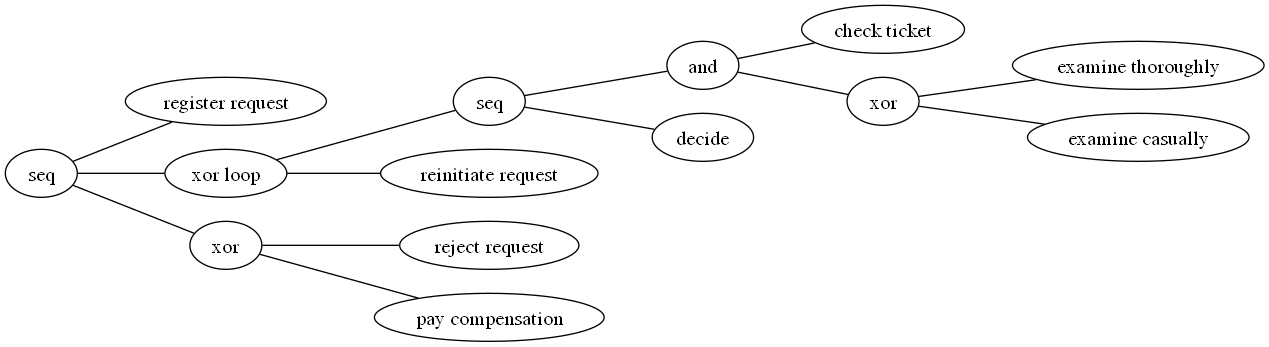
Next, we can convert the discovered model into a BPMN graph:
import pm4py
from pm4py.objects.bpmn.obj import BPMN

if __name__ == "__main__":
    bpmn_graph: BPMN = pm4py.convert_to_bpmn(tree)
