PM4Py Examples — Process Analysis Statistics
Where a snippet uses log, prepare it as a Pandas DataFrame using the import examples. Use filters to compare subsets, resource analysis to study collaboration, or feature extraction for further analysis.
In PM4Py, you can calculate various statistics on classic event logs and dataframes.
Throughput Time
Given an event log, you can retrieve the list of all case durations (expressed in seconds).
The only parameter needed is the timestamp. The code snippet below demonstrates this.
The outputs below use the Running Example log. Run this setup first:
import pm4py

log = pm4py.read_xes("tests/input_data/running-example.xes")import pm4py
if __name__ == "__main__":
all_case_durations: list[float] = pm4py.get_all_case_durations(log)[520920.0, 703320.0, 779580.0, 852300.0, 1368780.0, 1576440.0]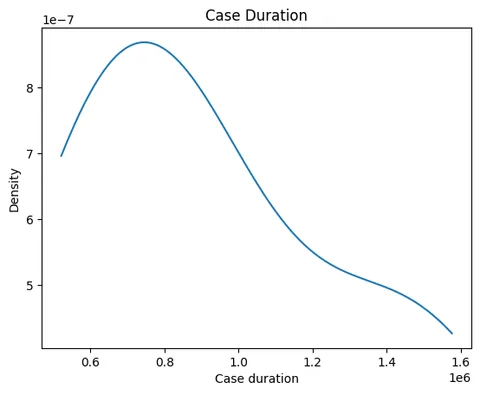
Case Arrival/Dispersion Ratio
You can retrieve the case arrival ratio from an event log. This ratio represents the average time between the arrival of two consecutive cases in the log.
import pm4py
if __name__ == "__main__":
case_arrival_ratio: float = pm4py.get_case_arrival_average(log)np.float64(123840.0)Additionally, you can calculate the case dispersion ratio, which represents the average time between the completion of two consecutive cases in the log.
from pm4py.statistics.traces.generic.pandas import case_arrival
if __name__ == "__main__":
	case_dispersion_ratio: float = case_arrival.get_case_dispersion_avg(log, parameters={
case_arrival.Parameters.TIMESTAMP_KEY: "time:timestamp"})np.float64(294144.0)Performance Spectrum
The performance spectrum is a novel visualization of process performance, based on the time elapsed between different activities in the process executions. It was initially described in:
Denisov, Vadim, et al. "The Performance Spectrum Miner: Visual Analytics for Fine-Grained Performance Analysis of Processes." BPM (Dissertation/Demos/Industry). 2018.
The performance spectrum works with an event log and a list of activities considered for building the spectrum. In the following example, the performance spectrum is built from the receipt event log, which includes the "Confirmation of receipt", "T04 Determine confirmation of receipt", and "T10 Determine necessity to stop indication" activities. The event log is loaded, and the performance spectrum (containing timestamps for the different activities during process execution) is computed and visualized:
import pm4py
import os
import pandas

if __name__ == "__main__":
	log: pandas.DataFrame = pm4py.read_xes(os.path.join("tests", "input_data", "receipt.xes"))
	pm4py.view_performance_spectrum(log, ["Confirmation of receipt", "T04 Determine confirmation of receipt",
										 "T10 Determine necessity to stop indication"], format="svg")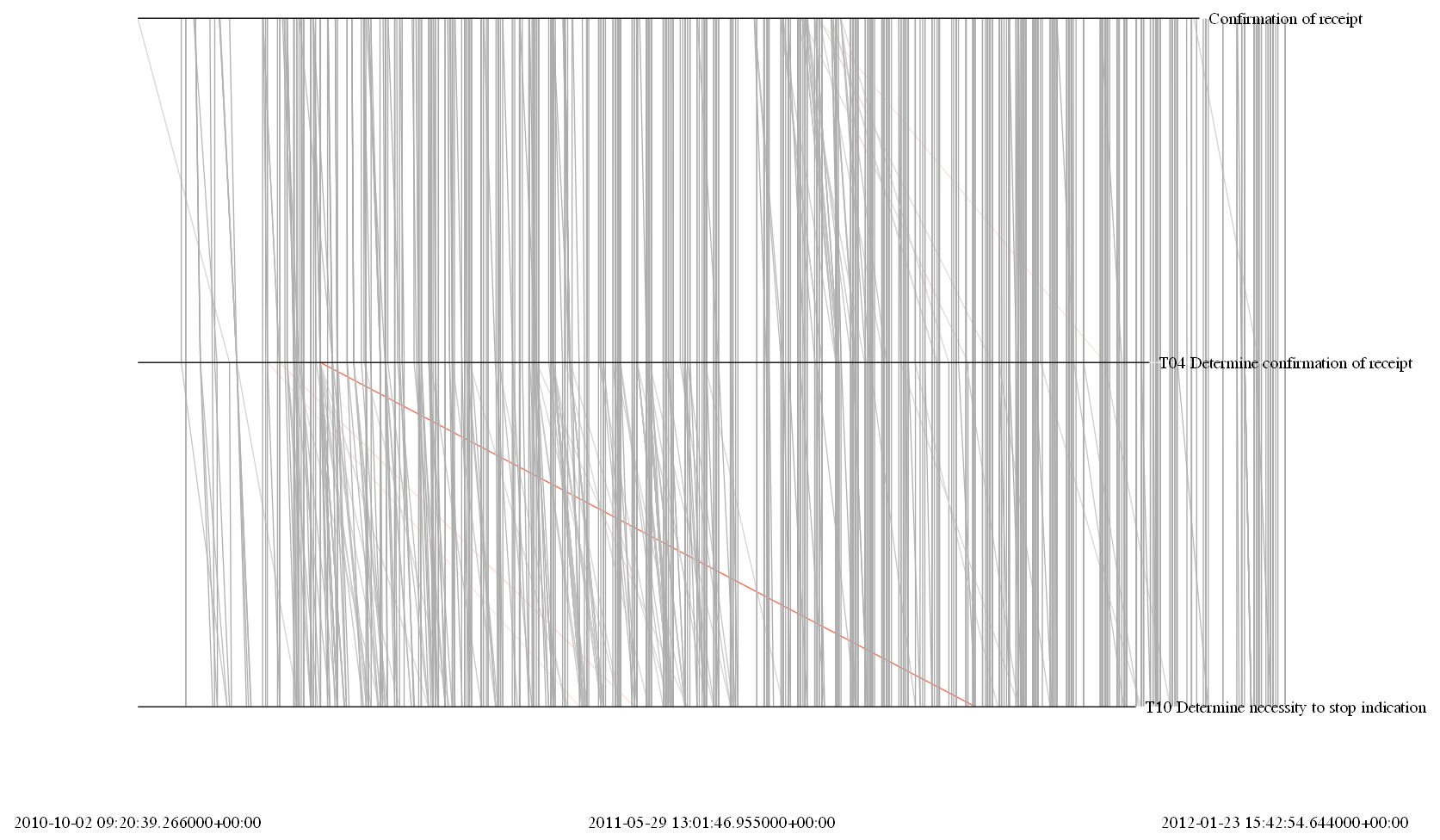
In the example, three horizontal lines represent the activities included in the spectrum, and several oblique lines represent the elapsed times between two activities. The more oblique lines are highlighted in different colors, making it easier to identify timestamps where the execution was more bottlenecked and potential patterns (e.g., FIFO, LIFO).
Cycle Time and Waiting Time
The lifecycle enrichment utility requires a legacy EventLog. Convert only for this operation; the other statistics below use the original DataFrame.
Two important KPIs for process executions are:
- The Lead Time: the overall time in which the instance was worked on, from start to finish, regardless of whether it was actively worked on.
- The Cycle Time: the total time in which the instance was actively worked on, from start to finish.
For interval event logs (those that have both start and end timestamps), the lead time and cycle time can be calculated incrementally for each event. The lead time and cycle time reported on the last event of a case correspond to the entire process execution. This helps to identify which activities caused bottlenecks, for example, when the lead time increases more significantly than the cycle time.
The PM4Py algorithm begins by sorting each case by the start timestamp (ensuring activities that started earlier are reported first in the log), and it can calculate the lead and cycle times for all situations, including complex ones. The following picture shows an example of this process:
The following attributes are added to events in the log:
Attributes
| Metric | Meaning |
|---|---|
| @@approx_bh_partial_cycle_time | Incremental cycle time associated with the event (the cycle time of the last event is the cycle time of the instance) |
| @@approx_bh_partial_lead_time | Incremental lead time associated with the event |
| @@approx_bh_overall_wasted_time | Difference between partial lead time and partial cycle time values |
| @@approx_bh_this_wasted_time | Wasted time for the activity defined by the ‘interval’ event |
| @@approx_bh_ratio_cycle_lead_time | Measures the incremental Flow Rate (between 0 and 1) |
The method for calculating lead and cycle times can be applied with the following code:
from pm4py.objects.log.util import interval_lifecycle
from pm4py.objects.log.obj import EventLog
if __name__ == "__main__":
	log = pm4py.read_xes("tests/input_data/interval_event_log.xes")
enriched_log: EventLog = interval_lifecycle.assign_lead_cycle_time(pm4py.convert_to_event_log(log)){'@@approx_bh_overall_wasted_time': 0,
'@@approx_bh_partial_cycle_time': 163.0,
'@@approx_bh_partial_lead_time': 163.0,
'@@approx_bh_this_wasted_time': 0}This results in an enriched log, where each event contains the corresponding attributes for lead and cycle time.
Activity Service Time (Sojourn Time)
The API calls this service time: completion timestamp minus start timestamp for each activity instance, averaged per activity, in seconds. It excludes time spent waiting before the start timestamp. This statistic works only with interval event logs, i.e., logs where each event has both a start timestamp and a completion timestamp.
The average sojourn time statistic calculates the time spent on each activity by averaging the time between the start and completion timestamps for the activity's events. Here’s an example of how to use it. First, we import an interval event log.
import pm4py
import os
import pandas

if __name__ == "__main__":
	log: pandas.DataFrame = pm4py.read_xes(os.path.join("tests", "input_data", "interval_event_log.xes"))
Then, we calculate the statistic, providing the attribute that represents the start timestamp and the attribute that represents the completion timestamp.
import pm4py

if __name__ == "__main__":
    soj_time: dict[str, float] = pm4py.get_service_time(
        log, start_timestamp_key="start_timestamp", timestamp_key="time:timestamp"
    )
print(soj_time){'cancel order': 1100.9219858156027,
'confirm payment': 843.2791111111111,
'make delivery': 2111.2213333333334,
'pay': 720.8782222222222,
'place order': 2521.849131121643,
'prepare delivery': 1758.4355555555555,
'send invoice': 803.0789889415482,
'send reminder': 1212.082264957265}Concurrent Activities
This statistic works only with interval event logs, i.e., logs where each event has both a start timestamp and a completion timestamp.
In interval event logs, the definition of event order is more flexible. A pair of events in a case can intersect in the following ways:
- An event where the start timestamp is greater than or equal to the completion timestamp of the other event.
- An event where the start timestamp is greater than or equal to the start timestamp of the other event but is less than the completion timestamp of the other event.
The second case represents event-based concurrency, where several events are actively executed at the same time.
You may want to retrieve the set of activities for which such concurrent execution occurs, along with the frequency of these occurrences. PM4Py can perform this calculation. Here’s an example. First, we import an interval event log.
import pm4py
import os
import pandas

if __name__ == "__main__":
	log: pandas.DataFrame = pm4py.read_xes(os.path.join("tests", "input_data", "interval_event_log.xes"))
Then, we calculate the statistic, providing the attribute that represents the start timestamp and the attribute that represents the completion timestamp.
from pm4py.statistics.concurrent_activities.pandas import get as conc_act_get

if __name__ == "__main__":
	conc_act: dict = conc_act_get.apply(log, parameters={conc_act_get.Parameters.TIMESTAMP_KEY: "time:timestamp", conc_act_get.Parameters.START_TIMESTAMP_KEY: "start_timestamp"})
print(conc_act){('confirm payment', 'make delivery'): 44, ('place order', 'send invoice'): 1}Eventually Follows Graph
We provide an approach for calculating the Eventually-Follows Graph (EFG).
The EFG represents the partial order of events within the process executions of the log.
Our implementation works for both lifecycle logs (logs where each event has only one timestamp) and interval logs (logs where each event has both a start and a completion timestamp). In the case of interval logs, the start timestamp is used to define the EFG/partial order.
Specifically, the method assumes lifecycle logs when no start timestamp is passed in the parameters, and it assumes interval logs when a start timestamp is provided.
Here's an example. First, we import an interval event log.
import pm4py
import os
import pandas

if __name__ == "__main__":
	log: pandas.DataFrame = pm4py.read_xes(os.path.join("tests", "input_data", "interval_event_log.xes"))
Then, we calculate the statistic, providing the attribute representing the completion timestamp and optionally the attribute representing the start timestamp.
import pm4py

if __name__ == "__main__":
efg_graph: dict = pm4py.discover_eventually_follows_graph(log){('confirm payment', 'make delivery'): 217,
('make delivery', 'confirm payment'): 851,
('pay', 'confirm payment'): 1125,
('pay', 'make delivery'): 1125,
('pay', 'prepare delivery'): 1125,
('pay', 'send invoice'): 8,
('place order', 'cancel order'): 141,
('place order', 'confirm payment'): 1125,
('place order', 'make delivery'): 1125,
('place order', 'pay'): 1125,
('place order', 'prepare delivery'): 1125,
('place order', 'send invoice'): 1265,
('place order', 'send reminder'): 936,
('prepare delivery', 'confirm payment'): 1125,
('prepare delivery', 'make delivery'): 1125,
('send invoice', 'cancel order'): 141,
… (excerpt)Displaying Graphs
Graphs help visualize various aspects of the current log, such as the distribution of numeric attributes, case duration, or events over time.
Distribution of Case Duration
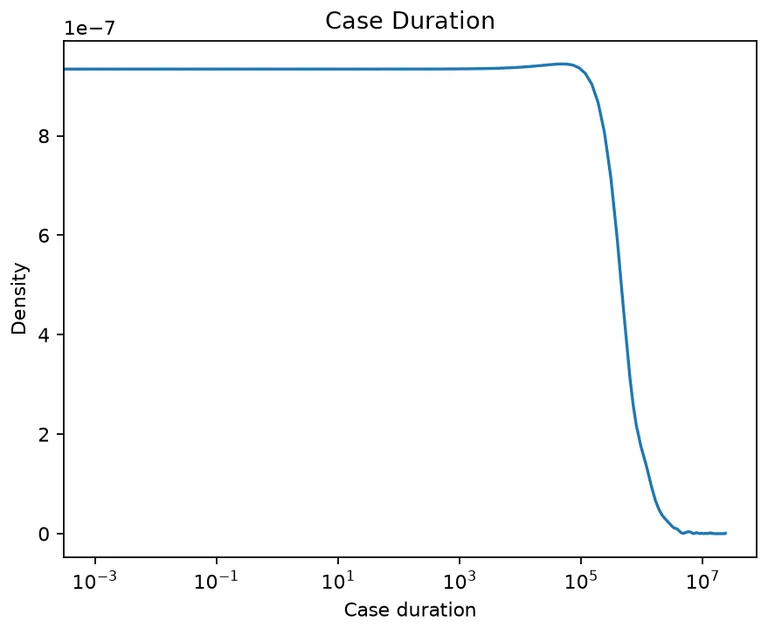
The following example demonstrates the distribution of case duration using two different graphs: a simple plot and a semi-logarithmic plot (on the X-axis). The semi-logarithmic plot is less sensitive to potential outliers.
First, the receipt log is loaded, and then the distribution related to case duration is obtained. Both a simple plot and a semi-logarithmic plot (on the X-axis) can be generated.
import os
import pm4py
import pandas
from graphviz import Graph

if __name__ == "__main__":
	log_path: str = os.path.join("tests","input_data","receipt.xes")
	log: pandas.DataFrame = pm4py.read_xes(log_path)

	from pm4py.util import constants
	from pm4py.statistics.traces.generic.pandas import case_statistics
	x: list[float]
	y: list[float]
	x, y = case_statistics.get_kde_caseduration(log, parameters={constants.PARAMETER_CONSTANT_TIMESTAMP_KEY: "time:timestamp"})

	from pm4py.visualization.graphs import visualizer as graphs_visualizer

	gviz: Graph = graphs_visualizer.apply_plot(x, y, variant=graphs_visualizer.Variants.CASES)
	graphs_visualizer.view(gviz)

	gviz = graphs_visualizer.apply_semilogx(x, y, variant=graphs_visualizer.Variants.CASES)
	graphs_visualizer.view(gviz)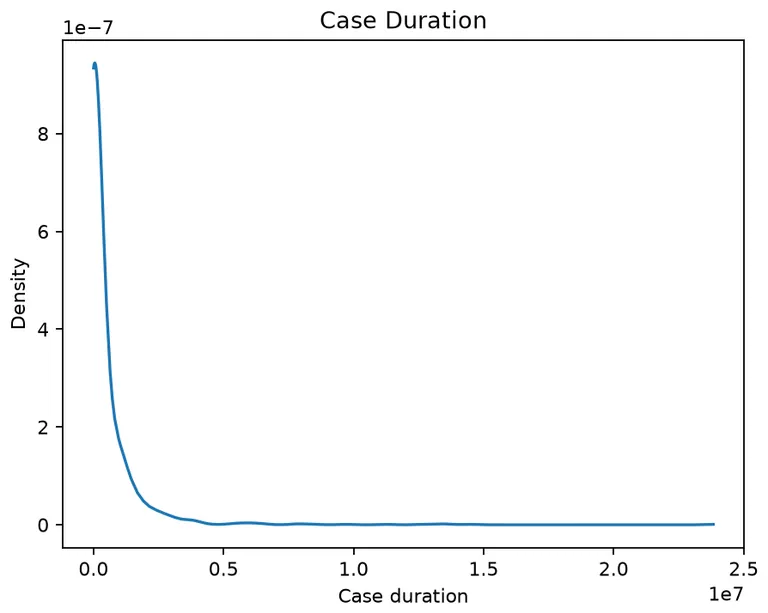
Distribution of Events Over Time
The following example illustrates a graph representing the distribution of events over time. This is especially important as it shows the time intervals when the greatest number of events is recorded.
The distribution of events over time is calculated, and the graph is plotted accordingly.
from pm4py.statistics.attributes.pandas import get as attributes_get
from graphviz import Graph

if __name__ == "__main__":
	x: list
	y: list[float]
	x, y = attributes_get.get_kde_date_attribute(log, attribute="time:timestamp")

	from pm4py.visualization.graphs import visualizer as graphs_visualizer

	gviz: Graph = graphs_visualizer.apply_plot(x, y, variant=graphs_visualizer.Variants.DATES)
	graphs_visualizer.view(gviz)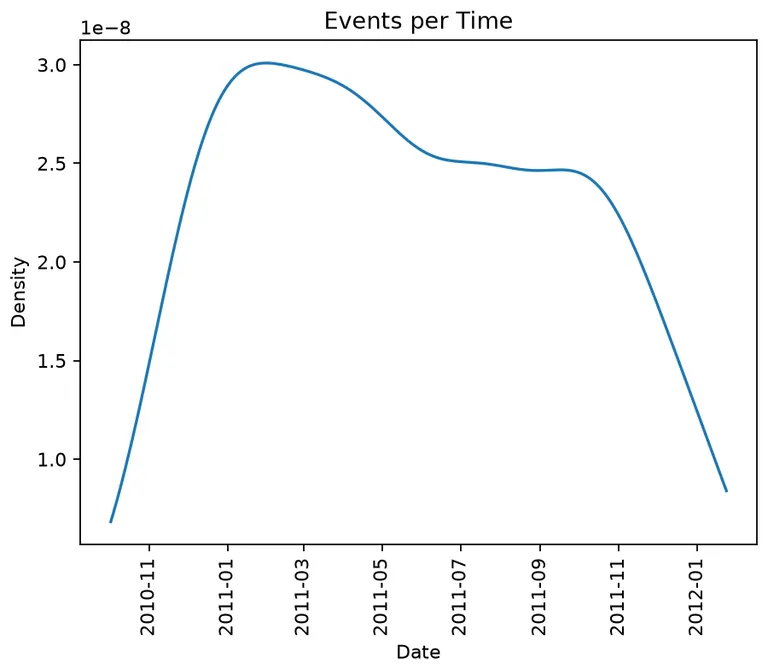
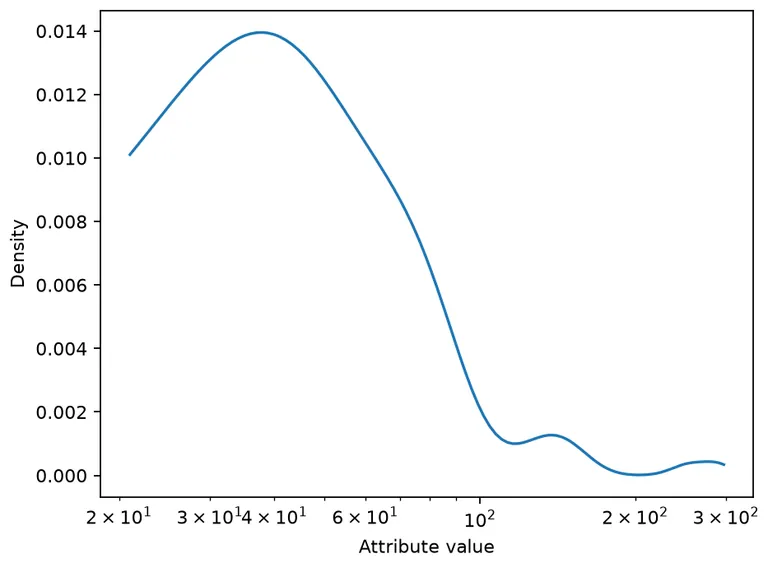
Distribution of a Numeric Attribute
The following example demonstrates two graphs related to the distribution of a numeric attribute: a standard plot and a semi-logarithmic plot (on the X-axis), which is less sensitive to outliers.
First, a filtered version of the Road Traffic log is loaded, followed by the distribution of the numeric attribute 'amount'. Both the standard plot and the semi-logarithmic plot can be generated.
import os
import pm4py
import pandas
from graphviz import Graph

log_path: str = os.path.join("tests", "input_data", "roadtraffic100traces.xes")

if __name__ == "__main__":
	log: pandas.DataFrame = pm4py.read_xes(log_path)

	from pm4py.statistics.attributes.pandas import get as attributes_get

	x: list[float]
	y: list[float]
	x, y = attributes_get.get_kde_numeric_attribute(log, "amount")

	from pm4py.visualization.graphs import visualizer as graphs_visualizer

	gviz: Graph = graphs_visualizer.apply_plot(x, y, variant=graphs_visualizer.Variants.ATTRIBUTES)
	graphs_visualizer.view(gviz)

	from pm4py.visualization.graphs import visualizer as graphs_visualizer

	gviz = graphs_visualizer.apply_semilogx(x, y, variant=graphs_visualizer.Variants.ATTRIBUTES)
	graphs_visualizer.view(gviz)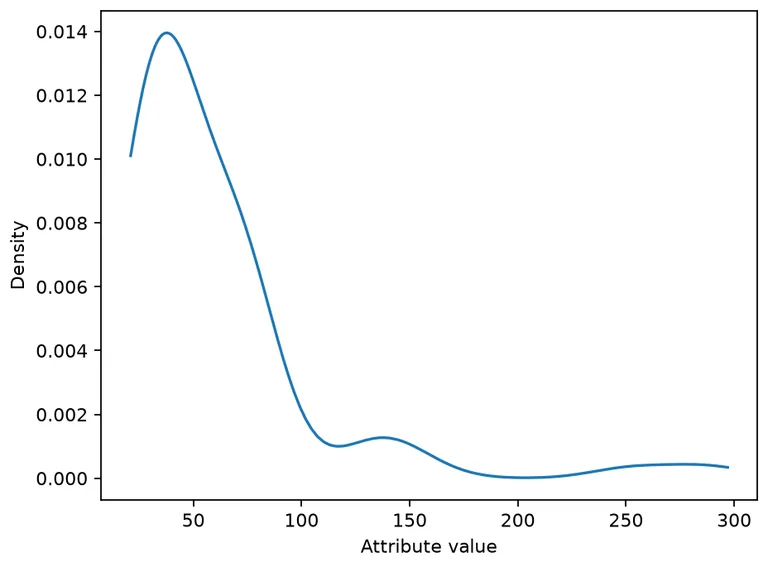
Dotted Chart
The dotted chart is a classic visualization technique for displaying events within an event log across different dimensions. Each event in the log corresponds to a point on the chart. The dimensions are projected onto the graph as follows:
- X-axis: represents the values of the first dimension.
- Y-axis: represents the values of the second dimension.
- Color: represents the values of the third dimension, with points displayed in different colors.
The dimensions can include string, numeric, or date values, which are appropriately managed by the dotted chart.
A common use case for the dotted chart is to visualize the distribution of cases and events over time using the following dimensions:
- X-axis: the timestamp of the event.
- Y-axis: the index of the case in the event log.
- Color: the activity of the event.
This setup enables the identification of patterns such as:
- Batches of events.
- Changes in the case arrival rate.
- Changes in the case finishing rate.
Below are examples of how to create and visualize the dotted chart based on both default and custom attribute selections.
To create the default dotted chart for the receipt event log, use the following code:
import pm4py
import os
import pandas

if __name__ == "__main__":
	log: pandas.DataFrame = pm4py.read_xes(os.path.join("tests", "input_data", "receipt.xes"))
	log["@@case_index"] = log.groupby("case:concept:name", sort=False).ngroup()
	pm4py.view_dotted_chart(log, format="svg", show_legend=False)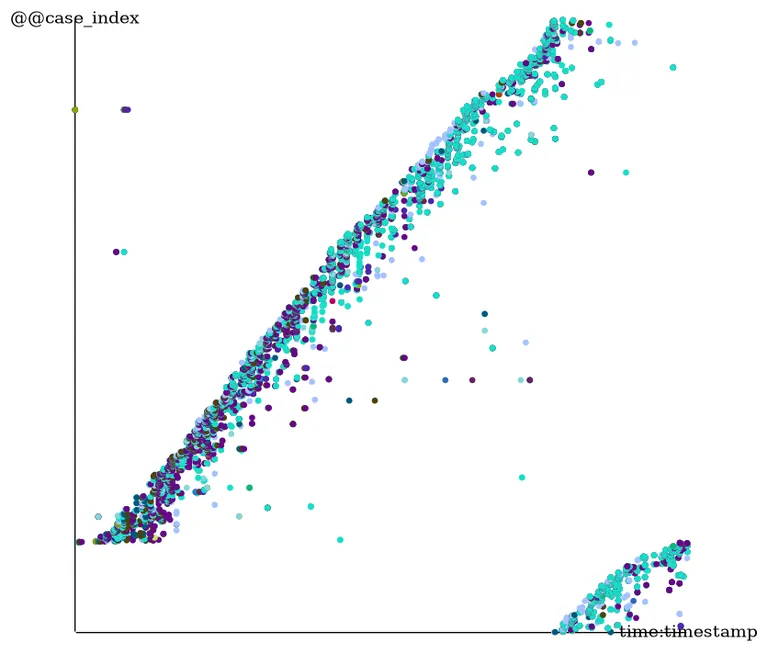
To create a custom dotted chart for the receipt event log using "concept:name" (activity), "org:resource" (organizational resource), and "org:group" (organizational group) as dimensions, use the following code:
import pm4py
import os
import pandas

if __name__ == "__main__":
	log: pandas.DataFrame = pm4py.read_xes(os.path.join("tests", "input_data", "receipt.xes"))
	pm4py.view_dotted_chart(log, format="svg", attributes=["concept:name", "org:resource", "org:group"])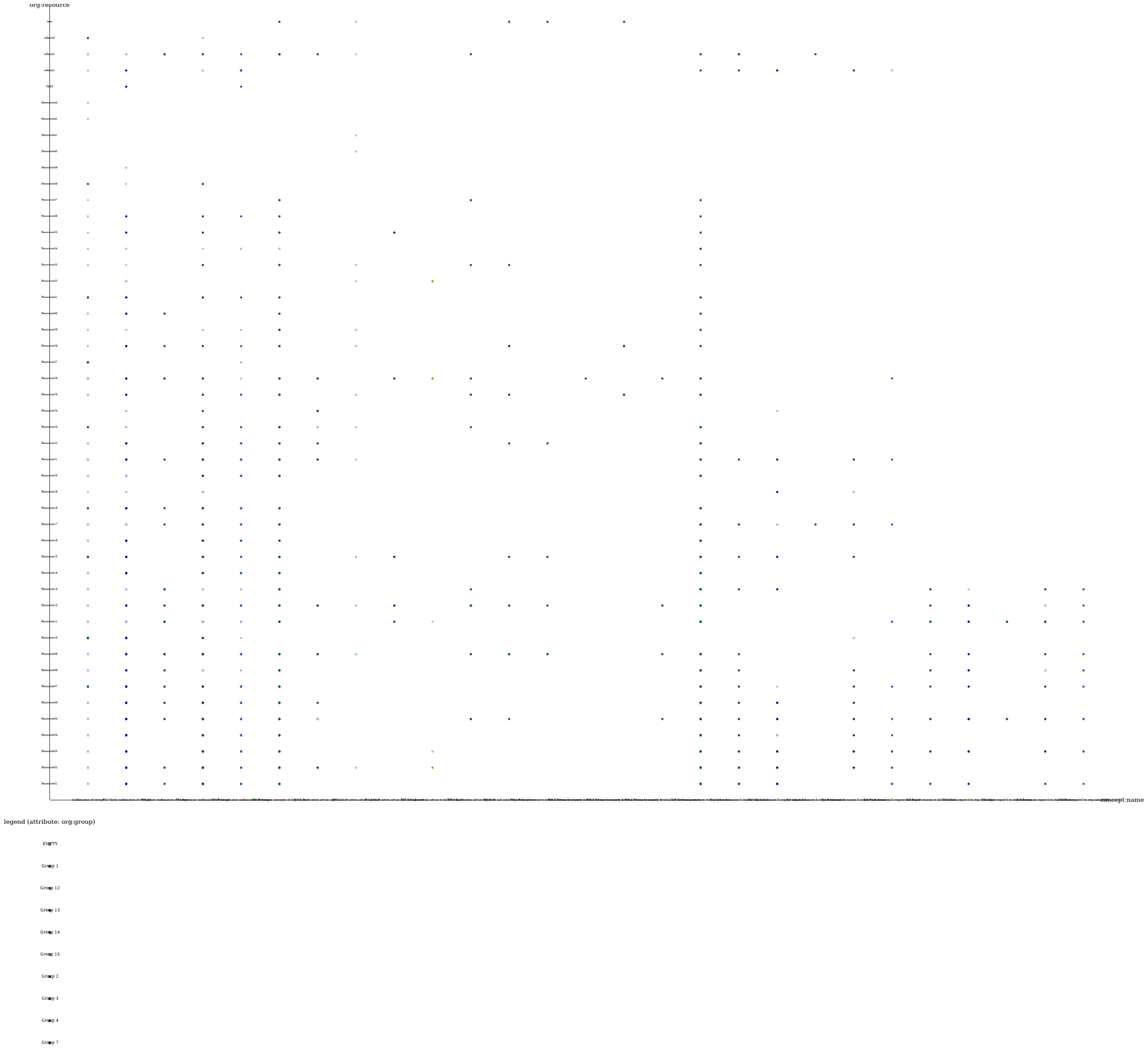
Event Distribution
Observing the distribution of events over time can provide valuable insights into work shifts, busy periods, and patterns throughout the year.
The distribution of events over time can be visualized by loading an event log and calculating the distribution across various time periods, such as hours of the day, days of the week, days of the month, months, or years.
import pm4py
import os
import pandas

if __name__ == "__main__":
	log: pandas.DataFrame = pm4py.read_xes(os.path.join("tests", "input_data", "receipt.xes"))
	pm4py.view_events_distribution_graph(log, distr_type="days_week", format="svg")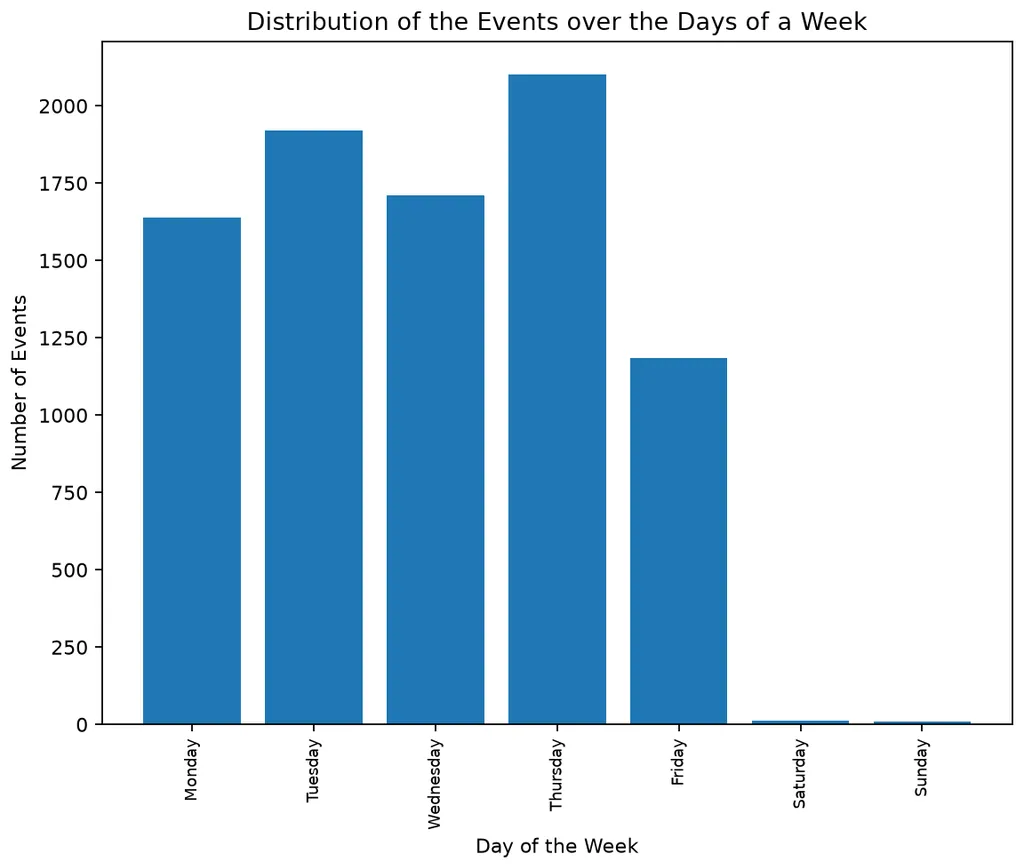
The parameter distr_type can take the following values:
- hours: plots the distribution over hours of the day.
- days_week: plots the distribution over days of the week.
- days_of_month: plots the distribution over days of the month.
- months: plots the distribution over months of the year.
- years: plots the distribution over different years in the log.
Detection of Batches
An activity is considered to be executed in batches by a given resource when the resource performs the same activity multiple times within a short period.
Identifying such activities can help uncover process areas that may benefit from automation, as repetitive activities may indicate inefficiencies.
Below is an example calculation using an event log to detect batches.
import pm4py
import os
import pandas

if __name__ == "__main__":
	log: pandas.DataFrame = pm4py.read_xes(os.path.join("tests", "input_data", "receipt.xes"))
	from pm4py.algo.discovery.batches import algorithm
	batches: list = algorithm.apply(log)
The results can be displayed as follows:
if __name__ == "__main__":
	for act_res in batches:
		print("")
		print("activity: " + act_res[0][0] + " resource: " + act_res[0][1])
		print("number of distinct batches: " + str(act_res[1]))
		for batch_type in act_res[2]:
print(batch_type, len(act_res[2][batch_type]))activity: T02 Check confirmation of receipt resource: Resource23
number of distinct batches: 4
Concurrent batching 4
activity: T10 Determine necessity to stop indication resource: Resource23
number of distinct batches: 3
Concurrent batching 3
activity: T10 Determine necessity to stop indication resource: Resource22
number of distinct batches: 3
Concurrent batching 3
activity: T10 Determine necessity to stop indication resource: Resource14
number of distinct batches: 3
Concurrent batching 3
… (excerpt)Our method can detect different types of batches, including:
- Simultaneous: all events in the batch have identical start and end timestamps.
- Batching at start: all events in the batch have identical start timestamps.
- Batching at end: all events in the batch have identical end timestamps.
- Sequential batching: for all consecutive events, the end of the first event is equal to the start of the second.
- Concurrent batching: consecutive events that are not sequentially matched.
Rework Activities
The rework statistic identifies activities that have been repeated during the same process execution, revealing inefficiencies in the process.
In our implementation, rework is calculated based on an event log or Pandas dataframe, and it returns a dictionary that associates each activity with the number of cases that contain rework for that activity.
Below is an example calculation on an event log.
import pm4py
import os
import pandas

if __name__ == "__main__":
	log: pandas.DataFrame = pm4py.read_xes(os.path.join("tests", "input_data", "receipt.xes"))
rework: dict[str, int] = pm4py.get_rework_cases_per_activity(log){'T02 Check confirmation of receipt': 35,
'T03 Adjust confirmation of receipt': 11,
'T04 Determine confirmation of receipt': 4,
'T06 Determine necessity of stop advice': 59,
'T07-1 Draft intern advice aspect 1': 8,
'T07-2 Draft intern advice aspect 2': 8,
'T07-3 Draft intern advice hold for aspect 3': 2,
'T07-5 Draft intern advice aspect 5': 5,
'T08 Draft and send request for advice': 1,
'T09-3 Process or receive external advice from party 3': 1,
'T12 Check document X request unlicensed': 1,
'T17 Check report Y to stop indication': 2,
'T18 Adjust report Y to stop indicition': 2}Rework Cases
Rework at the case level refers to the number of events in a case that repeat an activity already performed earlier in the case.
For example, if a case contains the activities A, B, A, B, C, D, the rework count is 2 since the events in positions 3 and 4 correspond to activities that have already occurred.
The rework statistic helps identify cases where many activities are repeated, indicating potential inefficiencies.
Below is an example calculation on an event log. After the computation, the dictio will contain entries for the six cases in the example log:
{ "1": { "number_activities": 5, "rework": 0 }, "2": { "number_activities": 5, "rework": 0 }, "3": { "number_activities": 9, "rework": 2 }, "4": { "number_activities": 5, "rework": 0 }, "5": { "number_activities": 13, "rework": 7 }, "6": { "number_activities": 5, "rework": 0 } }
import pm4py
from pm4py.statistics.rework.cases.pandas import get as cases_rework_get
import pandas

if __name__ == "__main__":
	log: pandas.DataFrame = pm4py.read_xes("tests/input_data/running-example.xes")

	dictio: dict = cases_rework_get.apply(log)
Query Structure Paths Over Time
We provide a feature that enables querying information about the paths in the event log at a specific point in time or within a time interval using an interval tree data structure.
This is useful for quickly computing the workload of resources over a given time interval or for measuring the number of open cases at any given time.
To transform an event log into an interval tree, use the following code:
import pm4py
import pandas
from intervaltree import IntervalTree

if __name__ == "__main__":
	log: pandas.DataFrame = pm4py.read_xes("tests/input_data/receipt.xes")

	from pm4py.algo.transformation.log_to_interval_tree import algorithm as log_to_interval_tree

	it: IntervalTree = log_to_interval_tree.apply(log)
The following example computes the workload (number of events) for each resource within the specified interval.
from collections import Counter
if __name__ == "__main__":
	intersecting_events = it[1318333540:1318333540+30*86400]
res_workload: Counter = Counter(x.data["target_event"]["org:resource"] for x in intersecting_events)Counter({'Resource03': 134,
'Resource06': 52,
'Resource02': 33,
'Resource09': 32,
'Resource20': 25,
'Resource16': 20,
'Resource13': 20,
'Resource14': 15,
'Resource05': 14,
'Resource21': 12,
'Resource30': 9,
'Resource25': 8,
'Resource04': 7,
'Resource01': 5,
'Resource22': 5,
'Resource23': 5,
… (excerpt)The following example computes the number of open cases for each directly-follows path in the log.
from collections import Counter
if __name__ == "__main__":
	intersecting_events = it[1318333540:1318333540+30*86400]
open_paths: Counter = Counter((x.data["source_event"]["concept:name"], x.data["target_event"]["concept:name"]) for x in intersecting_events)[(('T02 Check confirmation of receipt', 'T04 Determine confirmation of receipt'), 71),
(('T04 Determine confirmation of receipt', 'T05 Print and send confirmation of receipt'), 71),
(('Confirmation of receipt', 'T02 Check confirmation of receipt'), 68),
(('T06 Determine necessity of stop advice', 'T10 Determine necessity to stop indication'), 65),
(('T05 Print and send confirmation of receipt', 'T06 Determine necessity of stop advice'), 61)]Process Cube
The process cube slices a feature table along two dimensions (rows: x_col, columns: y_col) and aggregates a third column (agg_col), producing a pivot table and, for each cell, the set of case IDs that fall in that cell. It supports two binning modes per axis: numeric binning (if the column exists in the table), or prefix-based binning (if x_col/y_col is a prefix of multiple columns like concept:name_*).
Build the feature table once, then generate cubes as needed:
import pm4py
import os
import pandas

if __name__ == "__main__":
    dataframe: pandas.DataFrame = pm4py.read_xes(os.path.join("tests", "input_data", "receipt.xes"))
    enriched_df: pandas.DataFrame = pm4py.extract_outcome_enriched_dataframe(dataframe)
    feature_table: pandas.DataFrame = pm4py.extract_features_dataframe(enriched_df, include_case_id=True)
    print(feature_table.columns.tolist())
Example 1: presence × presence (activities × resources), aggregating the case sojourn time:
from pm4py.statistics.process_cube.variants import classic as process_cube_builder
import pandas

if __name__ == "__main__":
    # rows: activities (presence), columns: resources (presence), values: case sojourn time
    cube_df: pandas.DataFrame
    cell_case_dict: dict
    cube_df, cell_case_dict = process_cube_builder.apply(
        feature_table,
        x_col="concept:name",
        y_col="org:resource",
        agg_col="@@sojourn_time",
    )
print(cube_df)y_bin Resource10 Resource04 Resource29
x_bin
T03 Adjust confirmation of receipt 1.490583e+06 1.335998e+06 NaN
T11 Create document X request unlice 8.050782e+05 3.600002e+05 NaN
T06 Determine necessity of stop advi 7.976391e+05 3.325622e+05 1.239629e+06
T07-3 Draft intern advice hold for a 2.335936e+06 NaN NaN
T09-3 Process or receive external ad 5.234790e+05 NaN NaN You can filter the original dataframe by a specific cell using the returned cell_case_dict:
import pandas
# filter original dataframe on a specific cell using returned case IDs
if __name__ == "__main__":
    cell = list(cell_case_dict.keys())[0]
    filt_df: pandas.DataFrame = dataframe[dataframe["case:concept:name"].isin(cell_case_dict[cell])]
print(cell, len(filt_df))('concept:name_T03 Adjust confirmation of receipt', 'org:resource_Resource10') 136Example 2: numeric × numeric (arrival rate × finish rate) with automatic equal-width bins and mean aggregation:
from pm4py.statistics.process_cube.variants import classic as process_cube_builder
import pandas

if __name__ == "__main__":
    # rows: @@arrival_rate bins, columns: @@finish_rate bins, values: mean sojourn time
    cube_df2: pandas.DataFrame
    cell_case_dict2: dict
    cube_df2, cell_case_dict2 = process_cube_builder.apply(
        feature_table,
        x_col="@@arrival_rate",
        y_col="@@finish_rate",
        agg_col="@@sojourn_time",
        parameters={
            process_cube_builder.Parameters.MAX_DIVISIONS_X: 4,
            process_cube_builder.Parameters.MAX_DIVISIONS_Y: 4,
            process_cube_builder.Parameters.AGGREGATION_FUNCTION: "mean",
        }
    )
print(cube_df2) (-0.001, 319240.25] (319240.25, 638480.5] (638480.5, 957720.75] (957720.75, 1276961.0]
(-0.001, 277537.156] 4.695803e+05 525936.187500 NaN 133.253998
(277537.156, 555074.312] 2.190117e+05 2032.397827 NaN NaN
(555074.312, 832611.5] 1.037313e+06 NaN NaN NaN
(832611.5, 1110148.625] 6.136541e+05 NaN NaN NaNExample 3: specify manual numeric bins for both axes:
from pm4py.statistics.process_cube.variants import classic as process_cube_builder
import pandas

if __name__ == "__main__":
    # manually specify numeric bin edges for both axes
    cube_df3: pandas.DataFrame
    cell_case_dict3: dict
    cube_df3, cell_case_dict3 = process_cube_builder.apply(
        feature_table,
        x_col="@@arrival_rate",
        y_col="@@finish_rate",
        agg_col="@@sojourn_time",
        parameters={
            process_cube_builder.Parameters.X_BINS: [0, 200000, 500000, 800000, 1000000],
            process_cube_builder.Parameters.Y_BINS: [0, 300000, 600000, 900000, 1000000],
            process_cube_builder.Parameters.AGGREGATION_FUNCTION: "mean",
        }
    )
print(cube_df3) (-0.001, 300000.0] (300000.0, 600000.0] (600000.0, 900000.0] (900000.0, 1000000.0]
(-0.001, 200000.0] 4.766985e+05 610485.125000 NaN NaN
(200000.0, 500000.0] 2.521898e+05 1254.650635 NaN NaN
(500000.0, 800000.0] 1.037313e+06 NaN NaN NaN
(800000.0, 1000000.0] NaN NaN NaN NaN Parameters (in pm4py.statistics.process_cube.algorithm.Parameters):
| Parameter | Description |
|---|---|
| MAX_DIVISIONS_X | Number of equal-width bins on X when X_BINS not provided. |
| MAX_DIVISIONS_Y | Number of equal-width bins on Y when Y_BINS not provided. |
| AGGREGATION_FUNCTION | Aggregation to apply on agg_col (e.g., mean, sum, min, max). |
| X_BINS | Manual numeric bin edges for X (list of numbers); if provided, overrides automatic binning. |
| Y_BINS | Manual numeric bin edges for Y (list of numbers); if provided, overrides automatic binning. |
Partially Ordered Variants
These lifecycle and partially ordered variant utilities require legacy traces, so the examples explicitly request return_legacy_log_object=True.
Partially ordered variants use event logs with heterogeneous temporal information: events can have start and completion timestamps, or only a completion timestamp. Unlike traditional sequential variants, they preserve information about temporally overlapping events.
The paper introducing partially ordered variants is Defining and visualizing process execution variants from partially ordered event data by Schuster, D., Zerbato, F., van Zelst, S. J., and van der Aalst, W. M. P.
Low-Level Variants
Low-level variants show which event start or completion timestamps occur at the same time and how event executions overlap. This distinguishes partially overlapping interval events from atomic events that occur while another event is being executed.
The following example discovers low-level variants from interval_event_log.xes and visualizes the first one. The to_interval utility also accepts lifecycle logs and pairs start/completion events into intervals. A durational log, represented by one timestamp and an event-duration attribute, is also supported. See the API documentation for the relevant parameters.
from typing import List

from pm4py.algo.analysis.partially_ordered_variants.algorithm import get_low_level_variants
from pm4py.objects.partially_ordered_variants.low_level_variant import LowLevelVariant
from pm4py.visualization.partially_ordered_variants.visualizer import visualize_low_level_variant
import pm4py
from pm4py.objects.log.obj import EventLog
from pm4py.objects.log.util.interval_lifecycle import to_interval

if __name__ == "__main__":
    log: EventLog = pm4py.read_xes("tests/input_data/interval_event_log.xes", return_legacy_log_object=True)

    interval_log: EventLog = to_interval(log)
    ll_variants: List[LowLevelVariant] = get_low_level_variants(interval_log)

    if len(ll_variants):
        variant: LowLevelVariant = ll_variants[0]
        visualize_low_level_variant(variant)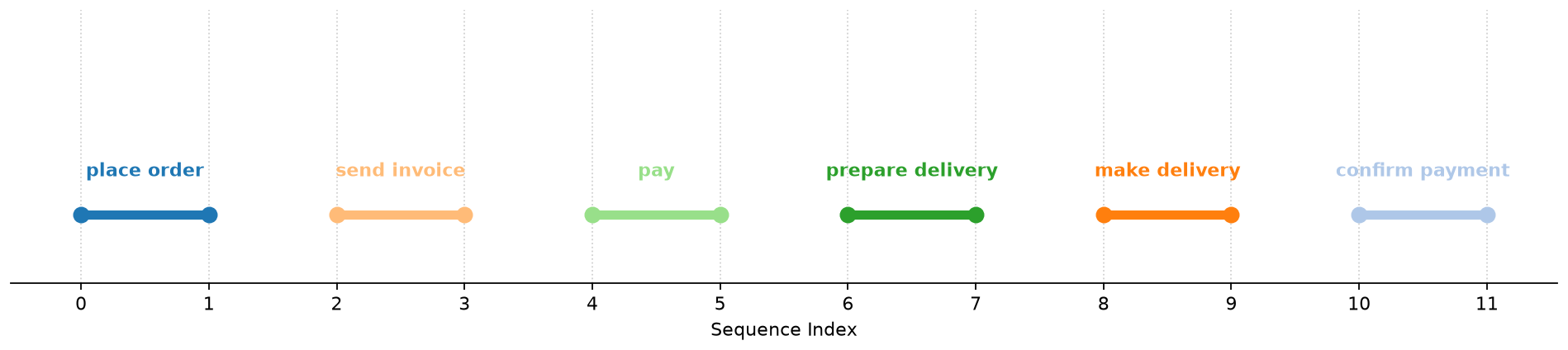
High-Level Variants
High-level variants provide a more abstract view. Multiple low-level variants can be summarized by one high-level variant that shows whether activities are executed concurrently or sequentially.
The following example discovers the high-level variants and visualizes the first one. As in the low-level example, this uses interval_event_log.xes; a lifecycle or durational log can be used instead.
from typing import List

from pm4py.algo.analysis.partially_ordered_variants.algorithm import get_high_level_variants
from pm4py.objects.partially_ordered_variants.high_level_variant import HighLevelVariant
from pm4py.visualization.partially_ordered_variants.visualizer import visualize_high_level_variant
import pm4py
from pm4py.objects.log.obj import EventLog
from pm4py.objects.log.util.interval_lifecycle import to_interval

if __name__ == "__main__":
    log: EventLog = pm4py.read_xes("tests/input_data/interval_event_log.xes", return_legacy_log_object=True)

    interval_log: EventLog = to_interval(log)
    hl_variants: List[HighLevelVariant] = get_high_level_variants(interval_log)

    if len(hl_variants):
        variant: HighLevelVariant = hl_variants[0]
        visualize_high_level_variant(variant)
