PM4Py Examples — Miscellaneous Streaming Process Mining
Start with event-data import for the offline DataFrame used below. Compare streaming results with batch DFG discovery and batch conformance checking. For multiple object types, see OCEL handling.
Streaming Package: General Structure
In PM4Py, we provide support for streaming process mining functionalities, including:
- Streaming process discovery (Directly-Follows Graph)
- Streaming conformance checking (Token-Based Replay)
- Streaming conformance checking (Footprints)
- Streaming import of XES/CSV files
Event stream management is handled by the pm4py.streaming.stream.live_event_stream.LiveEventStream class, which offers two key methods:
register(algo): Registers a new algorithm to the live event stream, notifying it whenever a new event is added.append(event): Appends a new event to the live event stream.
The LiveEventStream class processes incoming events using a thread pool, enabling the system to manage high volumes of events across multiple threads.
Streaming algorithms registered to the LiveEventStream must implement the following methods:
_process(event): Handles and processes incoming events._current_result(): Returns the current state of the streaming algorithm.
Streaming Process Discovery (Directly-Follows Graph)
The following example demonstrates how to discover a Directly-Follows Graph (DFG) from a stream of events. First, define the (live) event stream:
The examples use one worker (thread_pool_size=1) so each algorithm receives events in order. When replaying a DataFrame, a stable timestamp sort preserves the original order of events with equal timestamps.
from pm4py.streaming.stream.live_event_stream import LiveEventStream

if __name__ == "__main__":
    live_event_stream: LiveEventStream = LiveEventStream(parameters={"thread_pool_size": 1})
Next, create the streaming DFG discovery object:
from pm4py.streaming.algo.discovery.dfg import algorithm as dfg_discovery
from typing import Any

if __name__ == "__main__":
    streaming_dfg: Any = dfg_discovery.apply()
Register the DFG discovery object to the stream:
if __name__ == "__main__":
    live_event_stream.register(streaming_dfg)
Start the live stream:
if __name__ == "__main__":
    live_event_stream.start()
Import a known XES log:
import os
import pm4py
import pandas

if __name__ == "__main__":
    log: pandas.DataFrame = pm4py.read_xes(os.path.join("tests", "input_data", "running-example.xes"))
Convert the DataFrame into timestamp-ordered event dictionaries:
if __name__ == "__main__":
    static_event_stream = log.sort_values("time:timestamp", kind="stable").to_dict("records")
Add all events from the static stream to the live stream:
if __name__ == "__main__":
    for ev in static_event_stream:
        live_event_stream.append(ev)
After stopping the stream, ensure that all events have been fully processed:
if __name__ == "__main__":
    live_event_stream.stop()
Finally, retrieve the Directly-Follows Graph, including activities, start, and end activities:
if __name__ == "__main__":
    dfg: dict
    activities: dict[str, int]
    sa: dict
    ea: dict
    dfg, activities, sa, ea = streaming_dfg.get()
pm4py.view_dfg(dfg, sa, ea){'edges': {('check ticket', 'decide'): 6,
('check ticket', 'examine casually'): 2,
('check ticket', 'examine thoroughly'): 1,
('decide', 'pay compensation'): 3,
('decide', 'reinitiate request'): 3},
'end': {'pay compensation': 3, 'reject request': 3},
'start': {'register request': 6}}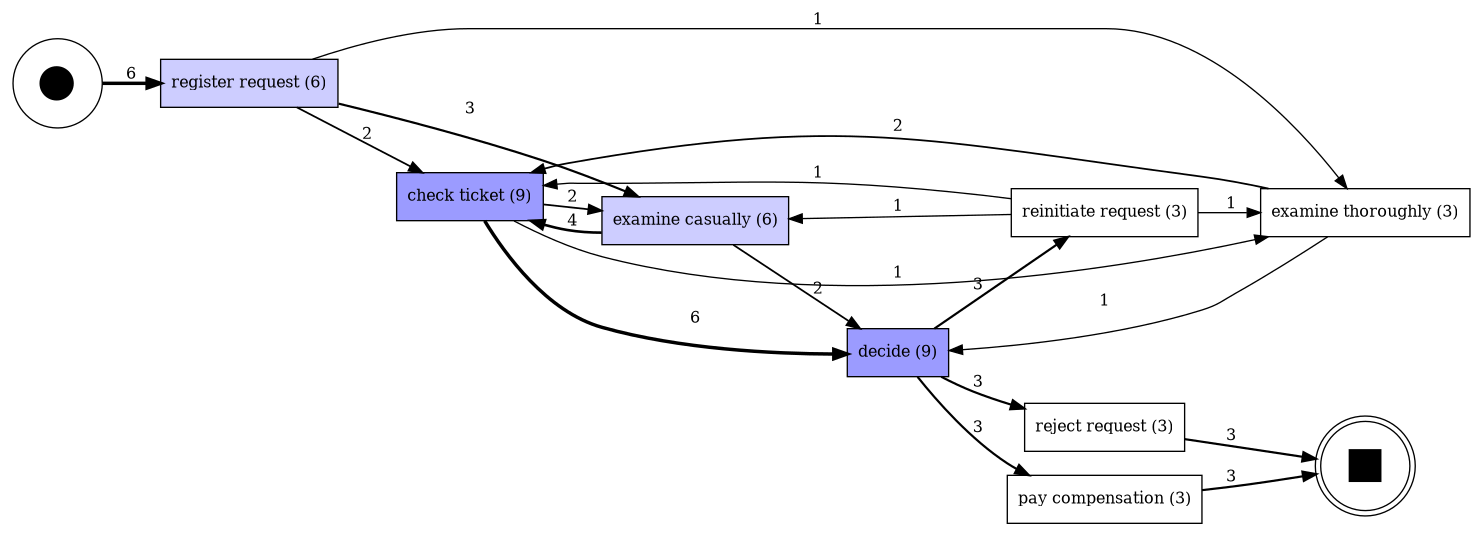
Running print(dfg) on the running-example.xes log produces the following:
{('register request', 'examine casually'): 3, ('examine casually', 'check ticket'): 4, ...}Streaming Conformance Checking (Token-Based Replay)
The following example shows how to perform conformance checking using Token-Based Replay (TBR) on a stream of events. We assume you are working with the running-example.xes log and a process model discovered with the Inductive Miner (default noise threshold: 0.2).
First, import the running-example.xes log:
import os
import pm4py
import pandas

if __name__ == "__main__":
    log: pandas.DataFrame = pm4py.read_xes(os.path.join("tests", "input_data", "running-example.xes"))
Convert the DataFrame into timestamp-ordered event dictionaries:
if __name__ == "__main__":
    static_event_stream = log.sort_values("time:timestamp", kind="stable").to_dict("records")
Discover a process tree using the Inductive Miner:
import pm4py
from pm4py.objects.process_tree.obj import ProcessTree

if __name__ == "__main__":
    tree: ProcessTree = pm4py.discover_process_tree_inductive(log)
Convert the process tree into a Petri net:
import pm4py
from pm4py.objects.petri_net.obj import Marking, PetriNet

if __name__ == "__main__":
    net: PetriNet
    im: Marking
    fm: Marking
    net, im, fm = pm4py.convert_to_petri_net(tree)
Create a live event stream and initialize the streaming TBR algorithm:
from pm4py.streaming.stream.live_event_stream import LiveEventStream

if __name__ == "__main__":
live_event_stream: LiveEventStream = LiveEventStream(parameters={"thread_pool_size": 1})from pm4py.streaming.algo.conformance.tbr import algorithm as tbr_algorithm
from typing import Any
if __name__ == "__main__":
streaming_tbr: Any = tbr_algorithm.apply(net, im, fm)Register the TBR algorithm to the live stream and start it:
if __name__ == "__main__":
live_event_stream.register(streaming_tbr)if __name__ == "__main__":
live_event_stream.start()Add events to the live event stream:
if __name__ == "__main__":
for ev in static_event_stream:
live_event_stream.append(ev)Stop the stream after processing:
if __name__ == "__main__":
live_event_stream.stop()Retrieve statistics on replay execution (e.g., number of missing tokens) as a Pandas dataframe. This method can be called during streaming to get up-to-date results:
if __name__ == "__main__":
conf_stats: dict = streaming_tbr.get()
print(conf_stats) case is_fit missing
0 5 True 0
1 6 True 0
2 1 True 0
3 2 True 0The following customizable methods print warnings during replay (can be overridden to send alerts, e.g., via email):
message_case_or_activity_not_in_eventmessage_activity_not_possiblemessage_missing_tokensmessage_case_not_in_dictionarymessage_final_marking_not_reached
Streaming Conformance Checking (Footprints)
Footprints are another conformance checking method offered in PM4Py, which can be applied in the context of streaming events. Below, we demonstrate an application of streaming footprints. First, we discover the footprints from the process model:
if __name__ == "__main__":
from pm4py.algo.discovery.footprints import algorithm as fp_discovery
footprints: dict = fp_discovery.apply(tree)Next, we create the live event stream:
from pm4py.streaming.stream.live_event_stream import LiveEventStream
if __name__ == "__main__":
live_event_stream: LiveEventStream = LiveEventStream(parameters={"thread_pool_size": 1})Then, we create the streaming footprints object:
from typing import Any
if __name__ == "__main__":
from pm4py.streaming.algo.conformance.footprints import algorithm as fp_conformance
streaming_footprints: Any = fp_conformance.apply(footprints)Afterward, we register it to the live event stream:
if __name__ == "__main__":
live_event_stream.register(streaming_footprints)We can then start the live event stream:
if __name__ == "__main__":
live_event_stream.start()Subsequently, we append every event of the original log to the live event stream:
if __name__ == "__main__":
    for ev in static_event_stream:
live_event_stream.append(ev)Finally, we stop the live event stream:
if __name__ == "__main__":
live_event_stream.stop()And retrieve the statistics of the conformance checking:
if __name__ == "__main__":
    conf_stats: dict = streaming_footprints.get()
print(conf_stats) case is_fit
0 5 True
1 6 True
2 1 True
3 2 TrueAdditionally, the following methods are available within the streaming footprints module to print warnings during the replay. These methods can easily be overridden (for example, to send notifications via email):
message_case_or_activity_not_in_eventmessage_activity_not_possiblemessage_footprints_not_possiblemessage_start_activity_not_possiblemessage_end_activity_not_possiblemessage_case_not_in_dictionary
Streaming Conformance Checking (Temporal Profile)
PM4Py also includes an implementation of the temporal profile model, described in: Stertz, Florian, Jürgen Mangler, and Stefanie Rinderle-Ma. "Temporal Conformance Checking at Runtime based on Time-infused Process Models." arXiv preprint arXiv:2008.07262 (2020).
A temporal profile measures, for every pair of activities in the log, the average time and standard deviation between events associated with those activities. The time is calculated from the completion of the first event to the start of the second event. Thus, it assumes working with an interval log where events have both a start and end timestamp. The output of temporal profile discovery is a dictionary where each activity pair (expressed as a tuple) is associated with a pair of numbers: the average time and the standard deviation.
It is possible to use a temporal profile to perform conformance checking on an event log. The time between pairs of activities in the log is evaluated against the stored profile values. Specifically, a score is computed indicating how many standard deviations the observed value deviates from the average. If this score exceeds a threshold (by default set to 6, according to Six Sigma principles), the pair is flagged.
In PM4Py, we provide a streaming conformance checking algorithm based on the temporal profile. This algorithm checks each incoming event against all previous events in the case, identifying deviations according to the temporal profile. Below is an example where a temporal profile is discovered, the streaming conformance checker is set up, and a log is replayed on the stream.
First, we load an event log and apply the discovery algorithm:
import pm4py
from pm4py.algo.discovery.temporal_profile import algorithm as temporal_profile_discovery
import pandas

if __name__ == "__main__":
    log: pandas.DataFrame = pm4py.read_xes("tests/input_data/running-example.xes")
    temporal_profile: dict = temporal_profile_discovery.apply(log)
We then create the stream, register the temporal conformance checking algorithm, and start the stream. The conformance checker can be initialized with several parameters:
from pm4py.streaming.stream.live_event_stream import LiveEventStream
from pm4py.streaming.algo.conformance.temporal import algorithm as temporal_conformance_checker
from typing import Any

if __name__ == "__main__":
    stream: LiveEventStream = LiveEventStream(parameters={"thread_pool_size": 1})
    temp_cc: Any = temporal_conformance_checker.apply(temporal_profile)
    stream.register(temp_cc)
stream.start()| Parameter Key | Type | Default | Description |
|---|---|---|---|
| Parameters.CASE_ID_KEY | string | case:concept:name | The attribute used as the case ID. |
| Parameters.ACTIVITY_KEY | string | concept:name | The attribute used as the activity name. |
| Parameters.START_TIMESTAMP_KEY | string | start_timestamp | The attribute used as the start timestamp. |
| Parameters.TIMESTAMP_KEY | string | time:timestamp | The attribute used as the end timestamp. |
| Parameters.ZETA | int | 6 | Multiplier for the standard deviation. Pairs of events exceeding this distance are flagged by the temporal profile. |
Next, we send the events from the log to the stream:
if __name__ == "__main__":
    for event in log.sort_values("time:timestamp", kind="stable").to_dict("records"):
        stream.append(event)
During the execution of the streaming temporal profile conformance checker, warnings are printed if a pair of events violates the temporal profile constraints. Furthermore, it is possible to retrieve a dictionary containing all cases with their associated deviations. The following code retrieves the results of the streaming temporal profile conformance checking:
if __name__ == "__main__":
    stream.stop()
res: dict = temp_cc.get(){}Streaming Importer (XES Trace-by-Trace)
To process traces from a XES event log that might not fit into memory, or when a sample of a large log is needed, the XES trace-by-trace streaming importer can be used. The importer works by simply providing the path to the log:
from pm4py.streaming.importer.xes import importer as xes_importer
from typing import Any

if __name__ == "__main__":
    streaming_log_object: Any = xes_importer.apply(os.path.join("tests", "input_data", "running-example.xes"), variant=xes_importer.Variants.XES_TRACE_STREAM)
It is then possible to iterate over the traces of the log (which are read one trace at a time):
if __name__ == "__main__":
    for trace in streaming_log_object:
print(trace){'attributes': {'concept:name': '3', 'creator': 'Fluxicon Nitro'}, 'events': [{'concept:name': 'register request', 'org:resource': 'Pete', ' …
{'attributes': {'concept:name': '2', 'creator': 'Fluxicon Nitro'}, 'events': [{'concept:name': 'register request', 'org:resource': 'Mike', ' …
{'attributes': {'concept:name': '1', 'creator': 'Fluxicon Nitro'}, 'events': [{'concept:name': 'register request', 'org:resource': 'Pete', ' …
{'attributes': {'concept:name': '6', 'creator': 'Fluxicon Nitro'}, 'events': [{'concept:name': 'register request', 'org:resource': 'Mike', ' …
{'attributes': {'concept:name': '5', 'creator': 'Fluxicon Nitro'}, 'events': [{'concept:name': 'register request', 'org:resource': 'Ellen', …
{'attributes': {'concept:name': '4', 'creator': 'Fluxicon Nitro'}, 'events': [{'concept:name': 'register request', 'org:resource': 'Pete', ' …
… (excerpt)Streaming Importer (XES Event-by-Event)
To process events from a XES event log that might not fit into memory, or when a sample of a large log is needed, the XES event-by-event streaming importer can be used. In this case, individual events within the traces are picked during iteration. The importer works by simply providing the path to the log:
from pm4py.streaming.importer.xes import importer as xes_importer
from typing import Any

if __name__ == "__main__":
    streaming_ev_object: Any = xes_importer.apply(os.path.join("tests", "input_data", "running-example.xes"), variant=xes_importer.Variants.XES_EVENT_STREAM)
It is then possible to iterate over the single events of the log (which are read during iteration):
if __name__ == "__main__":
    for event in streaming_ev_object:
print(event){'concept:name': 'register request', 'org:resource': 'Pete', 'time:timestamp': datetime.datetime(2010, 12, 30, 13, 32, tzinfo=datetime.timez …
{'concept:name': 'examine casually', 'org:resource': 'Mike', 'time:timestamp': datetime.datetime(2010, 12, 30, 14, 6, tzinfo=datetime.timezo …
{'concept:name': 'check ticket', 'org:resource': 'Ellen', 'time:timestamp': datetime.datetime(2010, 12, 30, 15, 34, tzinfo=datetime.timezone …
{'concept:name': 'decide', 'org:resource': 'Sara', 'time:timestamp': datetime.datetime(2011, 1, 6, 8, 18, tzinfo=datetime.timezone.utc), 'Ac …
{'concept:name': 'reinitiate request', 'org:resource': 'Sara', 'time:timestamp': datetime.datetime(2011, 1, 6, 11, 18, tzinfo=datetime.timez …
{'concept:name': 'examine thoroughly', 'org:resource': 'Sean', 'time:timestamp': datetime.datetime(2011, 1, 6, 12, 6, tzinfo=datetime.timezo …
{'concept:name': 'check ticket', 'org:resource': 'Pete', 'time:timestamp': datetime.datetime(2011, 1, 8, 10, 43, tzinfo=datetime.timezone.ut …
{'concept:name': 'decide', 'org:resource': 'Sara', 'time:timestamp': datetime.datetime(2011, 1, 9, 8, 55, tzinfo=datetime.timezone.utc), 'Ac …
{'concept:name': 'pay compensation', 'org:resource': 'Ellen', 'time:timestamp': datetime.datetime(2011, 1, 15, 9, 45, tzinfo=datetime.timezo …
{'concept:name': 'register request', 'org:resource': 'Mike', 'time:timestamp': datetime.datetime(2010, 12, 30, 10, 32, tzinfo=datetime.timez …
{'concept:name': 'check ticket', 'org:resource': 'Mike', 'time:timestamp': datetime.datetime(2010, 12, 30, 11, 12, tzinfo=datetime.timezone. …
{'concept:name': 'examine casually', 'org:resource': 'Sean', 'time:timestamp': datetime.datetime(2010, 12, 30, 13, 16, tzinfo=datetime.timez …
{'concept:name': 'decide', 'org:resource': 'Sara', 'time:timestamp': datetime.datetime(2011, 1, 5, 10, 22, tzinfo=datetime.timezone.utc), 'A …
{'concept:name': 'pay compensation', 'org:resource': 'Ellen', 'time:timestamp': datetime.datetime(2011, 1, 8, 11, 5, tzinfo=datetime.timezon …
{'concept:name': 'register request', 'org:resource': 'Pete', 'time:timestamp': datetime.datetime(2010, 12, 30, 10, 2, tzinfo=datetime.timezo …
{'concept:name': 'examine thoroughly', 'org:resource': 'Sue', 'time:timestamp': datetime.datetime(2010, 12, 31, 9, 6, tzinfo=datetime.timezo …
… (excerpt)Streaming Importer (CSV Event-by-Event)
To process events from a CSV event log that might not fit into memory, or when a sample of a large log is needed, using Pandas may not be feasible. In this case, individual rows of the CSV file are parsed during iteration. The importer can be used by simply providing the path to the CSV log:
from pm4py.streaming.importer.csv import importer as csv_importer
from typing import Any

if __name__ == "__main__":
    log_object: Any = csv_importer.apply(os.path.join("tests", "input_data", "running-example.csv"))
It is then possible to iterate over the individual events of the log (read during iteration):
if __name__ == "__main__":
    for event in log_object:
print(event){'': '0', 'concept:name': 'register request', 'org:resource': 'Pete', 'time:timestamp': '2010-12-30 14:32:00+01:00', 'Activity': 'register r …
{'': '1', 'concept:name': 'examine casually', 'org:resource': 'Mike', 'time:timestamp': '2010-12-30 15:06:00+01:00', 'Activity': 'examine ca …
{'': '2', 'concept:name': 'check ticket', 'org:resource': 'Ellen', 'time:timestamp': '2010-12-30 16:34:00+01:00', 'Activity': 'check ticket' …
{'': '3', 'concept:name': 'decide', 'org:resource': 'Sara', 'time:timestamp': '2011-01-06 09:18:00+01:00', 'Activity': 'decide', 'Resource': …
{'': '4', 'concept:name': 'reinitiate request', 'org:resource': 'Sara', 'time:timestamp': '2011-01-06 12:18:00+01:00', 'Activity': 'reinitia …
{'': '5', 'concept:name': 'examine thoroughly', 'org:resource': 'Sean', 'time:timestamp': '2011-01-06 13:06:00+01:00', 'Activity': 'examine …
{'': '6', 'concept:name': 'check ticket', 'org:resource': 'Pete', 'time:timestamp': '2011-01-08 11:43:00+01:00', 'Activity': 'check ticket', …
{'': '7', 'concept:name': 'decide', 'org:resource': 'Sara', 'time:timestamp': '2011-01-09 09:55:00+01:00', 'Activity': 'decide', 'Resource': …
{'': '8', 'concept:name': 'pay compensation', 'org:resource': 'Ellen', 'time:timestamp': '2011-01-15 10:45:00+01:00', 'Activity': 'pay compe …
{'': '9', 'concept:name': 'register request', 'org:resource': 'Mike', 'time:timestamp': '2010-12-30 11:32:00+01:00', 'Activity': 'register r …
{'': '10', 'concept:name': 'check ticket', 'org:resource': 'Mike', 'time:timestamp': '2010-12-30 12:12:00+01:00', 'Activity': 'check ticket' …
{'': '11', 'concept:name': 'examine casually', 'org:resource': 'Sean', 'time:timestamp': '2010-12-30 14:16:00+01:00', 'Activity': 'examine c …
{'': '12', 'concept:name': 'decide', 'org:resource': 'Sara', 'time:timestamp': '2011-01-05 11:22:00+01:00', 'Activity': 'decide', 'Resource' …
{'': '13', 'concept:name': 'pay compensation', 'org:resource': 'Ellen', 'time:timestamp': '2011-01-08 12:05:00+01:00', 'Activity': 'pay comp …
{'': '14', 'concept:name': 'register request', 'org:resource': 'Pete', 'time:timestamp': '2010-12-30 11:02:00+01:00', 'Activity': 'register …
{'': '15', 'concept:name': 'examine thoroughly', 'org:resource': 'Sue', 'time:timestamp': '2010-12-31 10:06:00+01:00', 'Activity': 'examine …
… (excerpt)OCEL Streaming
We offer support for streaming on OCEL. Current support includes:
- Iterating over the events of an OCEL,
- Listening to OCELs to direct them to traditional event listeners.
Events of an OCEL can be iterated as follows:
import pm4py
import os
from pm4py.objects.ocel.util import ocel_iterator
from pm4py.objects.ocel.obj import OCEL

if __name__ == "__main__":
    ocel: OCEL = pm4py.read_ocel(os.path.join("tests", "input_data", "ocel", "example_log.jsonocel"))
    for ev in ocel_iterator.apply(ocel):
print(ev){'ocel:eid': 'e1', 'ocel:timestamp': Timestamp('1980-01-01 00:00:00+0000', tz='UTC'), 'ocel:activity': 'Create Order', 'prova': 'ciao', 'pro …
{'ocel:eid': 'e2', 'ocel:timestamp': Timestamp('1980-01-02 00:00:00+0000', tz='UTC'), 'ocel:activity': 'Confirm Order', 'prova': 'ciao2', 'o …
{'ocel:eid': 'e3', 'ocel:timestamp': Timestamp('1980-01-03 00:00:00+0000', tz='UTC'), 'ocel:activity': 'Item out of Stock', 'ocel:type:eleme …
{'ocel:eid': 'e4', 'ocel:timestamp': Timestamp('1980-01-04 00:00:00+0000', tz='UTC'), 'ocel:activity': 'Create Delivery', 'ocel:type:element …
{'ocel:eid': 'e5', 'ocel:timestamp': Timestamp('1980-01-05 00:00:00+0000', tz='UTC'), 'ocel:activity': 'Item back in Stock', 'ocel:type:elem …
{'ocel:eid': 'e6', 'ocel:timestamp': Timestamp('1980-01-08 00:00:00+0000', tz='UTC'), 'ocel:activity': 'Delivery Failed', 'ocel:type:deliver …
{'ocel:eid': 'e7', 'ocel:timestamp': Timestamp('1980-01-09 00:00:00+0000', tz='UTC'), 'ocel:activity': 'Retry Delivery', 'ocel:type:delivery …
{'ocel:eid': 'e8', 'ocel:timestamp': Timestamp('1980-01-10 00:00:00+0000', tz='UTC'), 'ocel:activity': 'Delivery Successful', 'ocel:type:del …
{'ocel:eid': 'e9', 'ocel:timestamp': Timestamp('1980-01-11 00:00:00+0000', tz='UTC'), 'ocel:activity': 'Invoice Sent', 'ocel:type:order': [' …
{'ocel:eid': 'e10', 'ocel:timestamp': Timestamp('1980-01-12 00:00:00+0000', tz='UTC'), 'ocel:activity': 'Pay Order', 'ocel:type:order': ['o1 …
{'ocel:eid': 'e11', 'ocel:timestamp': Timestamp('1981-01-01 00:00:00+0000', tz='UTC'), 'ocel:activity': 'Create Order', 'ocel:type:element': …
{'ocel:eid': 'e12', 'ocel:timestamp': Timestamp('1981-01-02 00:00:00+0000', tz='UTC'), 'ocel:activity': 'Remove Item', 'ocel:type:element': …
{'ocel:eid': 'e13', 'ocel:timestamp': Timestamp('1981-01-03 00:00:00+0000', tz='UTC'), 'ocel:activity': 'Cancel Order', 'ocel:type:order': [ …
{'ocel:eid': 'e14', 'ocel:timestamp': Timestamp('1981-01-04 00:00:00+0000', tz='UTC'), 'ocel:activity': 'Create Order', 'ocel:type:element': …
{'ocel:eid': 'e15', 'ocel:timestamp': Timestamp('1981-01-05 00:00:00+0000', tz='UTC'), 'ocel:activity': 'Add Item to Order', 'ocel:type:elem …
{'ocel:eid': 'e16', 'ocel:timestamp': Timestamp('1981-01-06 00:00:00+0000', tz='UTC'), 'ocel:activity': 'Create Delivery', 'ocel:type:elemen …
… (excerpt) A complete example is shown below, where we take an OCEL, instantiate two event streams for the order and element object types respectively, and push the flattened events to them. The two event listeners are attached with a printer, such that each flattened event is printed on the screen when received.
import pm4py
import os
from pm4py.streaming.stream import live_event_stream
from pm4py.streaming.util import event_stream_printer
from pm4py.streaming.conversion import ocel_flatts_distributor
from pm4py.objects.ocel.util import ocel_iterator
from pm4py.objects.ocel.obj import OCEL
from pm4py.streaming.stream.live_event_stream import LiveEventStream
from typing import Any

if __name__ == "__main__":
    ocel: OCEL = pm4py.read_ocel(os.path.join("tests", "input_data", "ocel", "example_log.jsonocel"))
    # We want to use the traditional algorithms for streaming also on object-centric event logs.
    # For this purpose, first we create two different event streams, one for the "order" object type
    # and one for the "element" object type.
    order_stream: LiveEventStream = live_event_stream.LiveEventStream(parameters={"thread_pool_size": 1})
    element_stream: LiveEventStream = live_event_stream.LiveEventStream(parameters={"thread_pool_size": 1})
    # Then, we register an algorithm for each of them, which is a simple printer of the received events.
    order_stream_printer: Any = event_stream_printer.EventStreamPrinter()
    element_stream_printer: Any = event_stream_printer.EventStreamPrinter()
    order_stream.register(order_stream_printer)
    element_stream.register(element_stream_printer)
    # Then, we create the distributor object.
    # This registers different event streams for different object types.
    flatts_distributor: Any = ocel_flatts_distributor.OcelFlattsDistributor()
    flatts_distributor.register("order", order_stream)
    flatts_distributor.register("element", element_stream)
    order_stream.start()
    element_stream.start()
    # In this way, we iterate over the events of an OCEL
    for ev in ocel_iterator.apply(ocel):
        # And the OCEL event is sent to all the "flattened" event streams.
        flatts_distributor.append(ev)
        # Since the "flattened" event streams register a printer each, what we get is a print
        # of all the events that reach these instances.
    order_stream.stop()
element_stream.stop()event received: {'ocel:eid': 'e1', 'prova': 'ciao', 'prova2': 456.0, 'concept:name': 'Create Order', 'time:timestamp': Timestamp('1980-01-01 …
event received: {'ocel:eid': 'e1', 'prova': 'ciao', 'prova2': 456.0, 'concept:name': 'Create Order', 'time:timestamp': Timestamp('1980-01-01 …
event received: {'ocel:eid': 'e1', 'prova': 'ciao', 'prova2': 456.0, 'concept:name': 'Create Order', 'time:timestamp': Timestamp('1980-01-01 …
event received: {'ocel:eid': 'e1', 'prova': 'ciao', 'prova2': 456.0, 'concept:name': 'Create Order', 'time:timestamp': Timestamp('1980-01-01 …
event received: {'ocel:eid': 'e3', 'concept:name': 'Item out of Stock', 'time:timestamp': Timestamp('1980-01-03 00:00:00+0000', tz='UTC'), ' …
event received: {'ocel:eid': 'e4', 'concept:name': 'Create Delivery', 'time:timestamp': Timestamp('1980-01-04 00:00:00+0000', tz='UTC'), 'ca …
event received: {'ocel:eid': 'e4', 'concept:name': 'Create Delivery', 'time:timestamp': Timestamp('1980-01-04 00:00:00+0000', tz='UTC'), 'ca …
event received: {'ocel:eid': 'e5', 'concept:name': 'Item back in Stock', 'time:timestamp': Timestamp('1980-01-05 00:00:00+0000', tz='UTC'), …
event received: {'ocel:eid': 'e11', 'concept:name': 'Create Order', 'time:timestamp': Timestamp('1981-01-01 00:00:00+0000', tz='UTC'), 'case …
event received: {'ocel:eid': 'e11', 'concept:name': 'Create Order', 'time:timestamp': Timestamp('1981-01-01 00:00:00+0000', tz='UTC'), 'case …
event received: {'ocel:eid': 'e12', 'concept:name': 'Remove Item', 'time:timestamp': Timestamp('1981-01-02 00:00:00+0000', tz='UTC'), 'case: …
event received: {'ocel:eid': 'e14', 'concept:name': 'Create Order', 'time:timestamp': Timestamp('1981-01-04 00:00:00+0000', tz='UTC'), 'case …
event received: {'ocel:eid': 'e14', 'concept:name': 'Create Order', 'time:timestamp': Timestamp('1981-01-04 00:00:00+0000', tz='UTC'), 'case …
event received: {'ocel:eid': 'e15', 'concept:name': 'Add Item to Order', 'time:timestamp': Timestamp('1981-01-05 00:00:00+0000', tz='UTC'), …
event received: {'ocel:eid': 'e16', 'concept:name': 'Create Delivery', 'time:timestamp': Timestamp('1981-01-06 00:00:00+0000', tz='UTC'), 'c …
event received: {'ocel:eid': 'e16', 'concept:name': 'Create Delivery', 'time:timestamp': Timestamp('1981-01-06 00:00:00+0000', tz='UTC'), 'c …
… (excerpt)